
How to Set Up Your ChatGPT Business Hub Profile
ChatGPT just gave businesses their own listing, a lot like Google Business Profile. We set ours up last week, and the next day we already had 50 mentions.
OpenAI recently launched ChatGPT Business Hub, a place for business owners to create a custom listing about their company. The best way to think of it is like a Google Business Profile, except instead of showing up in Google results, you're showing up inside ChatGPT.
We set up our business on ChatGPT, and in the first day it mentioned us over 50 times. Not many businesses have taken advantage of it yet. Here's what it is, why it matters, and how to set yours up.
Prefer to watch? We also recorded a walkthrough on our YouTube channel👇
What ChatGPT Business Hub is
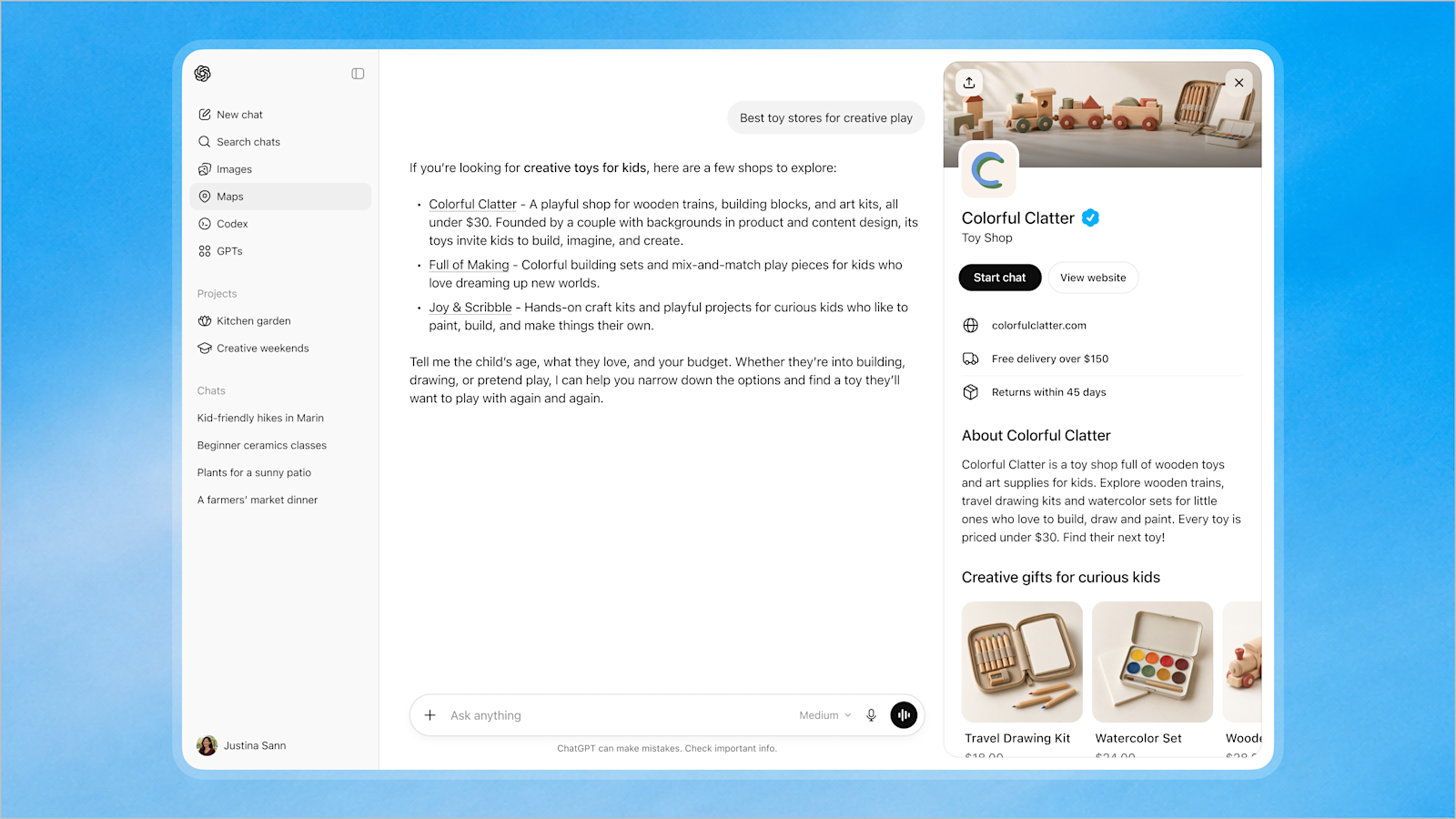
It's a listing you control. You can add your name, address, and contact information, plus what you do and who you serve. You also get analytics on how your business is showing up in ChatGPT prompts. Beyond the listing itself, you can create a basic agent people can interact with to ask questions about your business, how you work, and how to get in touch.
If you sell physical products, you can list them with pricing. You can add products one by one, upload a product feed, or connect a platform like Shopify.
The profiles are still pretty basic. This launched only a couple of weeks ago, and you can bet they'll add features over time.
Why this matters for business leaders
ChatGPT has over a billion active users worldwide. It's quickly becoming a competitor to Google in the way people research and make buying decisions. Customers are already in ChatGPT asking questions and learning about products and services like yours. Having visibility on this platform is important today, and it's only going to matter more.
You don't have to have a Business Hub profile for ChatGPT to know you exist. It already crawls your website. Creating a profile gives you more visibility and a lot more control over what actually shows up.
I want to be honest here. OpenAI hasn't come out and said this will increase your likelihood of showing up. But after I created one for our business, the very next day I had 50 recorded mentions in ChatGPT of people looking for our services. Based on that early experience, it seems to help.
The control is just as important as the visibility. In the profile, you can explain your company and your services, add FAQs, and customize the look with your logo, graphics, and a cover photo. Those details help you show up more, and they make you look more professional when you do.
You also get basic analytics: how often you show up, how many website clicks you get through the profile, and the topics you're showing up for. The analytics are simple right now, which makes sense for something this new.
How to set up your ChatGPT Business Hub Profile
The process is relatively straightforward, though I ran into some bugs along the way. This is a new product, so expect a few rough edges.
One thing to know up front: you will need to verify your identity with a government-issued ID, and in my case that verification took about 10 to 12 hours. Start that process early so you're not waiting around later when you're ready to finish and publish.
- Have an admin do the setup. You want someone who should have control over how your company shows up in AI. That might be the business owner, a marketing leader, or someone on the IT side. Once the profile is set up, you can add other admins.
- Find or create your listing. Log in to ChatGPT and go to the Business Hub page. Search for your business name. If a listing already exists, click it and verify it. If you're not listed yet, you can type in the name and create a new listing.
- Tell it how you sell. It will ask whether you sell primarily online through your website, or whether you sell physical products through a physical location.
- Verify your website with a DNS record. ChatGPT will prompt you to verify the business through your website URL by adding a DNS text record. This part can get a little technical, so if you don't have a web administration background, you may want help from your IT team or web development company. Add the text record that ties your Business Hub profile to your domain, then verify it.
- Add your contact information and a short description. You'll be asked for a phone number, email address, and a brief description of what your business does. For the description, I went into ChatGPT, told it the keywords I want to be found for, and used that as a starting point.
- Verify your identity with a government ID. This is required, and the process is outsourced through a third party. I used my driver's license. They take some photos and start the review, then you wait. In my case, it took about 10 to 12 hours for them to verify my ID and my business before I could publish. Start this initial process right away, then come back and finish the profile once you're approved.
- Finish the profile and set up the agent. Once you're verified, add your logo, cover image, and more context about the business so that when people find you, they can actually learn who you are. Then open the Agent Builder and add a tagline, suggested questions, and instructions for how the agent should respond. Publish the agent so people can chat with it, not just read the listing.
- Add products if you sell them. If you're a product-based company, this is a must. You can add SKUs and pricing, or upload a product feed if you use third-party e-commerce software. This matters because you can get found not only when people search for your business, but also when they search for the products you offer.
- Publish. When everything is in place, publish the profile and it's live.
What to do after you publish
Going forward, I'd check this every week or two. Look at how many mentions you've had, whether you're starting to get clicks, and which topics people are searching when you show up.
More important is what comes next. This is likely just the start of how ChatGPT will use Business Hub. We expect they'll follow a path similar to Google Business Profile, with more features over time, more ways to connect with your audience, and more ways to add rich content to your profile.
If you've already set up your profile, or if you want a second set of eyes on how your business should show up in AI search, I'd love to hear from you. Drop a comment below or contact us.